 Hounds
中文
Log in
Step 14 of 14
Shortcuts and the Telegram Bot
Press ? on the website for the shortcut sheet; order hotkeys stay off until you turn them on. The Telegram bot @Houndsbot shares one system with the website: the same account, wallets, positions and settings.
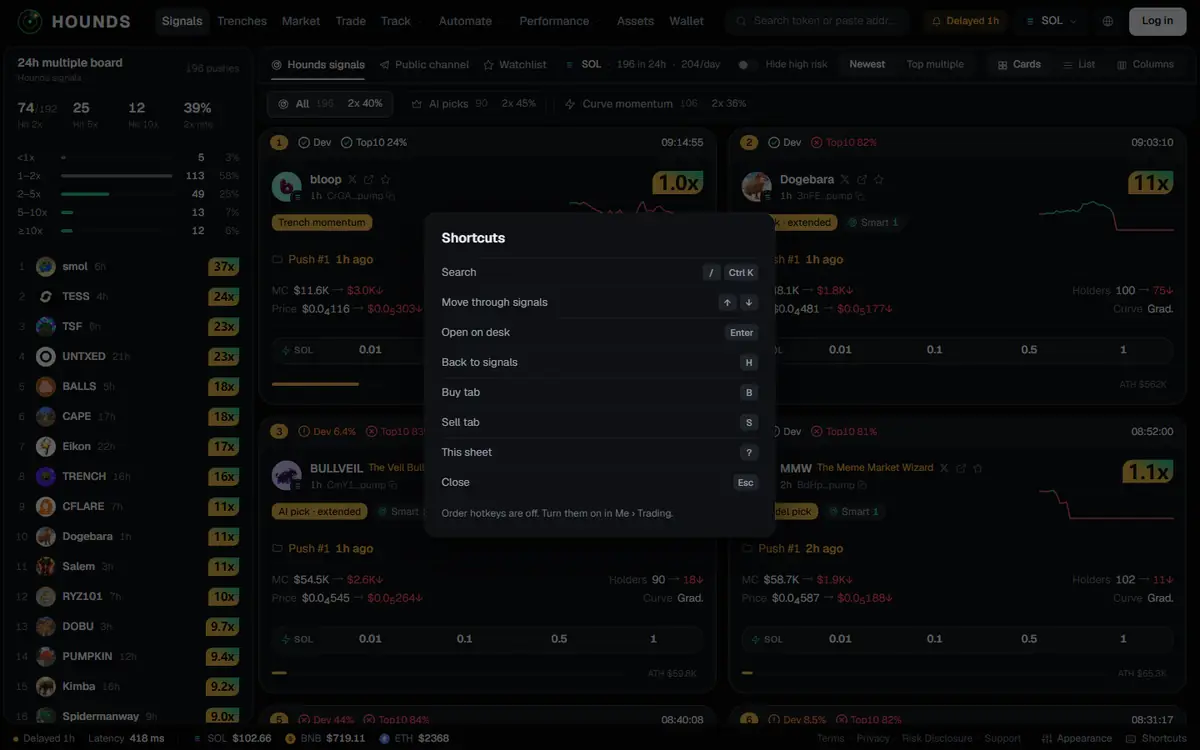
15.1 Website shortcuts
Tap Shortcuts in the bottom status bar, or press ?, to open the shortcut sheet. Shortcuts do nothing while you are typing in an input box.
| Key | What it does |
|---|---|
/ or Ctrl K | Search |
↑ / ↓ (trading desk) | Move through signals |
Enter (in search results) | Open on desk |
H | Back to signals |
B / S (trading desk) | Buy tab / Sell tab |
? | This sheet |
Esc | Close |
Order hotkeys (off by default): turn them on under Account → Trading → This device → Order hotkeys. Once on, with a token selected on the trading desk and the cursor not in an input box:
| Key | What it does |
|---|---|
Shift + 1–4 | Buy with your 1st–4th quick-buy amount |
Shift + Q / W / E | Sell 25% / 50% / all |
They place the order immediately, just like the quick-buy buttons, so they are off by default; they only apply to this browser on this computer.
15.2 Telegram Bot
- The bot is https://t.me/Houndsbot ; the Telegram icon in the website's top bar opens it too.
- The website and the bot share one system: the same account, wallets, positions, sell rules, auto-trading and copy settings. Log in to the web with Continue with Telegram, or link Telegram under Account → Profile → Login methods, and both sides show the same data. An email-only account that created its wallet on the web does not need, and can no longer link, Telegram (1.2).
- In the bot you can send a contract address to look up a token and buy or sell in one tap, see positions and sell strategies, and use limit orders, Telegram signal pushes (including custom channels), auto-trading, copy trading, bridging, transfers out, referral rebates and more. Send
/helpin the bot to see how to use it. - For accounts with Telegram linked, the confirmation for setting the trading password for the first time or resetting it, and for setting a web login password on the linked email, is sent to Telegram.
- Web alerts only fire while the page is open; to get signals on your phone at any time, use the bot's signal pushes (6.8).
Disclaimer: Hounds is in beta. Research signals, past statistics, backtest results and risk estimates are not investment advice and do not predict future results. Memecoins are extremely risky; only trade with money you can afford to lose entirely. You are responsible for your trades, your settings and backing up your keys.
Try it on the workbench while you read.
Open the workbench