 Hounds
中文
Log in
Step 4 of 14
Sell rules
Pick a default sell rule: Quick flip, Upside first, Steady first, or your own mix of cost recovery, take-profit steps, trailing exit, stop loss and time stop. It runs on the server at live prices, and you can change it for a single position.
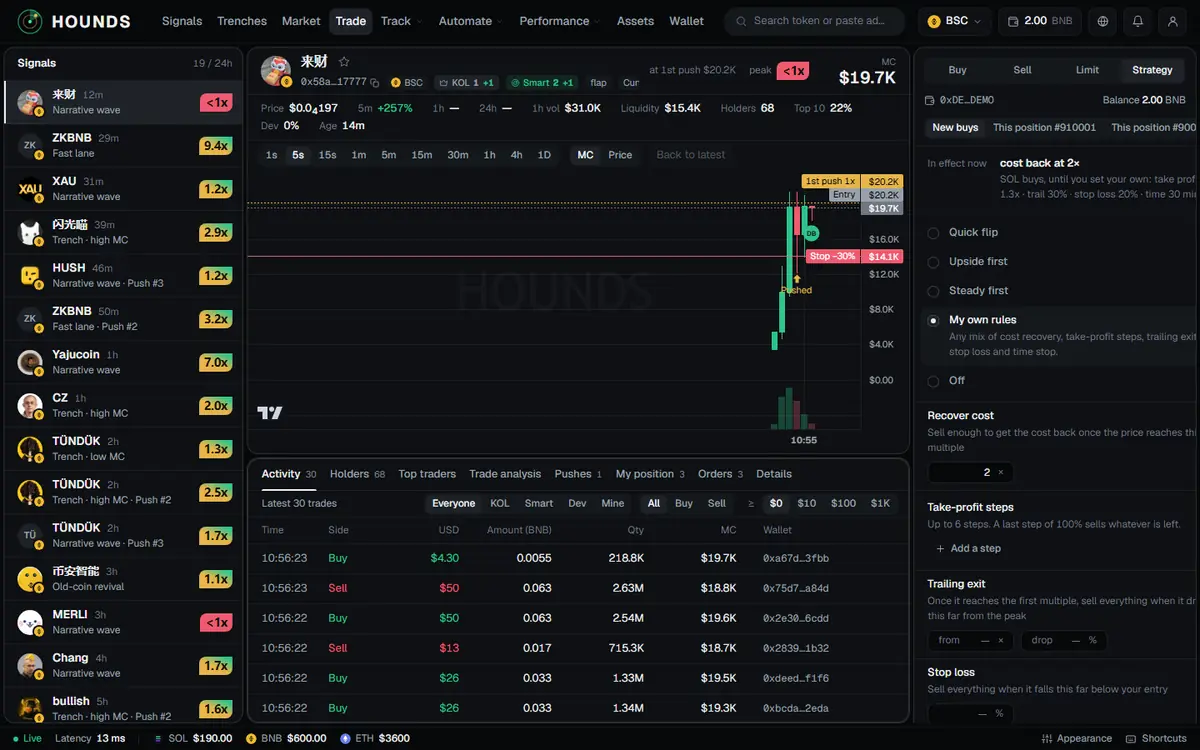
This section covers having the system sell for you after you buy. Every rule runs on the server at live prices, so you do not need to keep the page open.
4.1 Default rule (used by every position you buy from now on)
Account → Trading → Sell rules (the trade panel's Strategy tab → New buys is the same form). "In effect now" at the top shows the current rule. Pick one of five modes and tap Save:
| Mode | Rule (as shown on the page) |
|---|---|
| Quick flip | Sell everything at 1.3×. Stop loss at −20%. Sell everything after 30 minutes. |
| Upside first | SOL: after 1.3×, sell everything on a 20% drop from the peak; stop loss −50%; sell everything after 30 minutes. BSC: after 1.5×, sell everything on a 50% drop from the peak; stop loss −50%; sell everything after 2 hours. |
| Steady first | SOL: sell everything at 1.75×; stop loss −50%; sell everything after 20 minutes. BSC: same as Upside first. |
| My own rules | Any mix of cost recovery, take-profit steps, trailing exit, stop loss and time stop. |
| Off | Nothing is sold automatically. You sell by hand. |
- These two presets cover SOL and BSC only. Other chains keep the setting they had.
- Changing the default applies only to positions you buy from now on. Change existing positions one by one (4.3).
- An account that has never saved a sell rule defaults to "cost back at 2×" (at 2× it sells part of the position to get the cost back). New SOL positions use a different set instead: sell half at 1.3×, then sell everything on a 30% drop from the peak; stop loss −20%; sell everything after 30 minutes. Under "In effect now" the page shows "SOL buys, until you set your own: …". Once you save your own rule, every chain uses yours.
4.2 The five parts of "My own rules"
Every multiple is measured from your buy price.
| Rule | What it does (as shown on the page) | Allowed range |
|---|---|---|
| Recover cost | Sell enough to get the cost back once the price reaches this multiple. | 1.1–100× |
| Take-profit steps | Each step takes a multiple and a sell share; tap Add a step to add one, up to 6 steps. A last step of 100% sells whatever is left. | Multiples 1.05–1000 without repeats, shares 1–100%, total at most 100% (the last step may be 100%) |
| Trailing exit | Once it reaches the first multiple (from), sell everything when it drops this far (drop) from the peak. | Start 1–1000×, drop 5–95% |
| Stop loss | Sell everything when it falls this far below your entry. | 5–95% |
| Time stop | After this long, sell everything if the peak never reached the multiple (below; 100 = always sell). | 1–1440 minutes, multiple 1–100 |
Fill in at least one rule, or choose Off. A wrong entry shows "Check “…”: a value is missing or out of range".
4.3 Change one position only
Three entry points, same effect: it changes auto-sell for this position only; tiers that already fired do not sell again:
- Trading desk My position → the Auto-sell button on that row → "Sell rules · $TICKER" opens → make your changes and tap Apply to this position.
- Trade panel Strategy tab → choose This position (with a #number if you hold more than one).
- Drag this position's stop-loss / take-profit line on the chart: you see "Stop-loss for this position set to −x%" or "First take-profit for this position set to Nx". A stop-loss has to be below the entry price, and a take-profit above it.
4.4 How the rules run
- When several rules fire at the same price, the order is: stop loss → time stop → trailing exit → recover cost → each take-profit step. Each rule (each step) runs only once, so nothing is oversold.
- Positions opened by auto-trading or auto-copy: if your rules have no stop loss, a −50% stop loss is added automatically (not on top of the SOL default set or AI picks follow, which come with their own exits).
- When a rule's sell does not fill, the system retries automatically; exit orders such as stop loss, trailing exit and time stop that failed on slippage are retried quickly with slippage raised step by step (up to 50%). After several failures you are notified to sell by hand.
- If the wallet's native coin cannot cover the network fee, auto-sell waits for you to top up (3.4); it does not give up.
Try it on the workbench while you read.
Open the workbench