 Hounds
中文
Log in
Step 8 of 14
Wallet copy trading
Follow up to 10 wallets. Alert only tells you when one buys; Auto-buy buys the same token with your per-buy amount within your 24h budget, and Copy sells can sell it when that wallet sells.
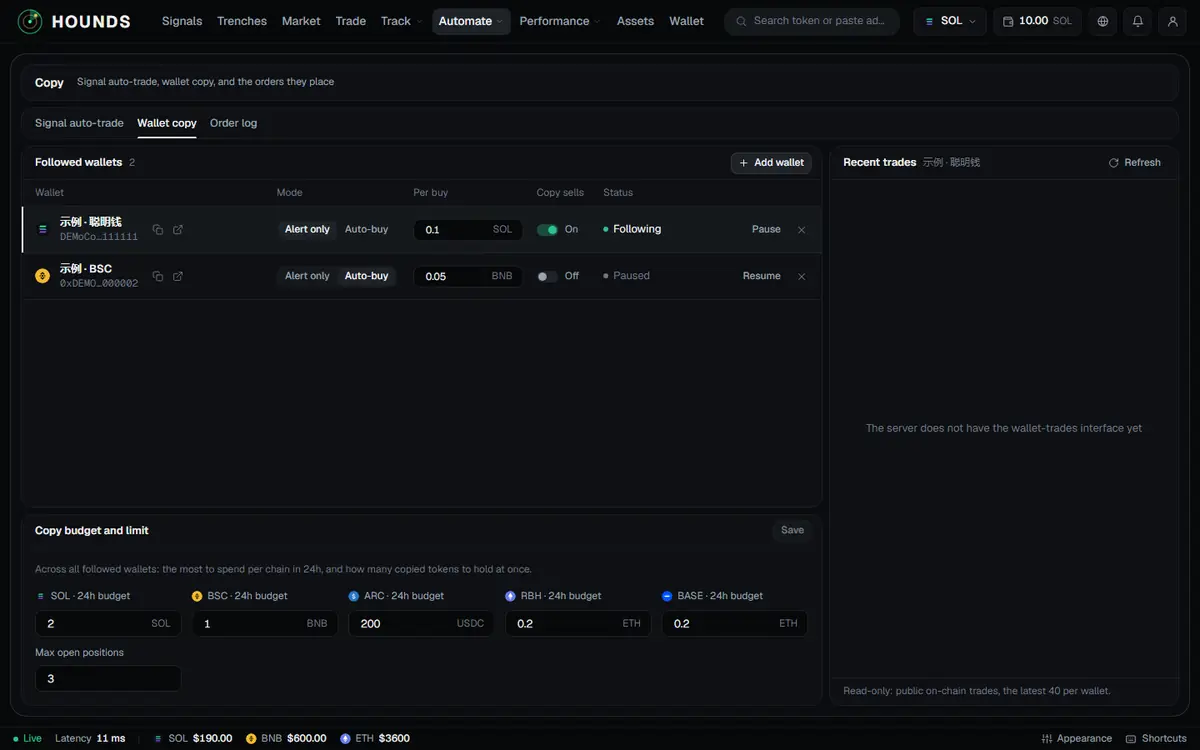
This section covers watching other people's wallets: get an alert when one buys, or copy the buy automatically with your own amount. You need to be logged in and have a wallet, and any of your wallets must have a balance above 0.
8.1 Add a wallet
Automate → Copy in the top bar → Wallet copy tab → Add wallet:
| Field | What to enter |
|---|---|
| Wallet address | A Solana address, or one starting with 0x. |
| Chain | The chain to follow this address on. |
| Note (optional) | e.g. a friend’s wallet. |
| Per-buy amount (optional) | Only used in "Auto-buy" mode. You can change it after adding. |
Once you enter the address, the page shows "m trades in the last n days" so you can check it; tap Follow. A new wallet starts in "Alert only" mode and buys nothing automatically. You can follow up to 10 wallets.
8.2 Settings for each wallet
The Followed wallets table: Wallet, Mode, Per buy, Copy sells, Status.
| Setting | What it does |
|---|---|
| Mode: Alert only / Auto-buy | Switching to auto-buy asks you to confirm: when this wallet buys, the same token is bought automatically with funds from your wallet, using the "Per buy" amount. Trades can lose money. |
| Per buy | Blank = default (the chain's default per-buy amount for auto-trading); cannot exceed the per-trade limit. |
| Copy sells | When on and the wallet sells a token you copied, the system sells 100% of that copied position. |
| Pause / Resume · Delete | Deleting only stops following; positions already bought are not touched. |
Tap a wallet on the left and Recent trades on the right shows its latest public on-chain trades (the latest 40 per wallet).
8.3 Copy budget and limit
Copy budget and limit: across all followed wallets, a 24h budget per chain (the most to spend on each chain in 24 hours) and Max open positions (1–20, how many copied tokens to hold at once). Tap Save when you are done. Defaults (as shown on the page): SOL 1 · BSC 0.5 BNB · ARC 200 USDC · RBH 0.1 ETH, max open positions 5.
8.4 How it runs
- An auto-copy only fires when all of these hold: the wallet's trade is no more than 30 seconds old when found, amount / budget / positions are within your limits, and each token is copied only once.
- Auto-copied positions follow your sell rules; if your rules have no stop loss, a −50% stop loss is added automatically.
- A copy wallet added or turned on from a new device is marked "New device · full copy in ~n h": for 24 hours it only copies buys of tokens the platform pushed in the last 24 hours.
- Copy trades usually fill later than the wallet you follow, and the later, the worse; that wallet may also be wash trading or dumping. Use small amounts at your own risk.
Try it on the workbench while you read.
Open the workbench