 Hounds
中文
Log in
Step 5 of 14
Limit orders
In short
On the Limit tab of the trade panel, set a market cap (50k) or a change from the current price (+100%, -30%) to buy or sell automatically. Up to 10 open orders, valid for 1–72 hours, 24 hours by default.
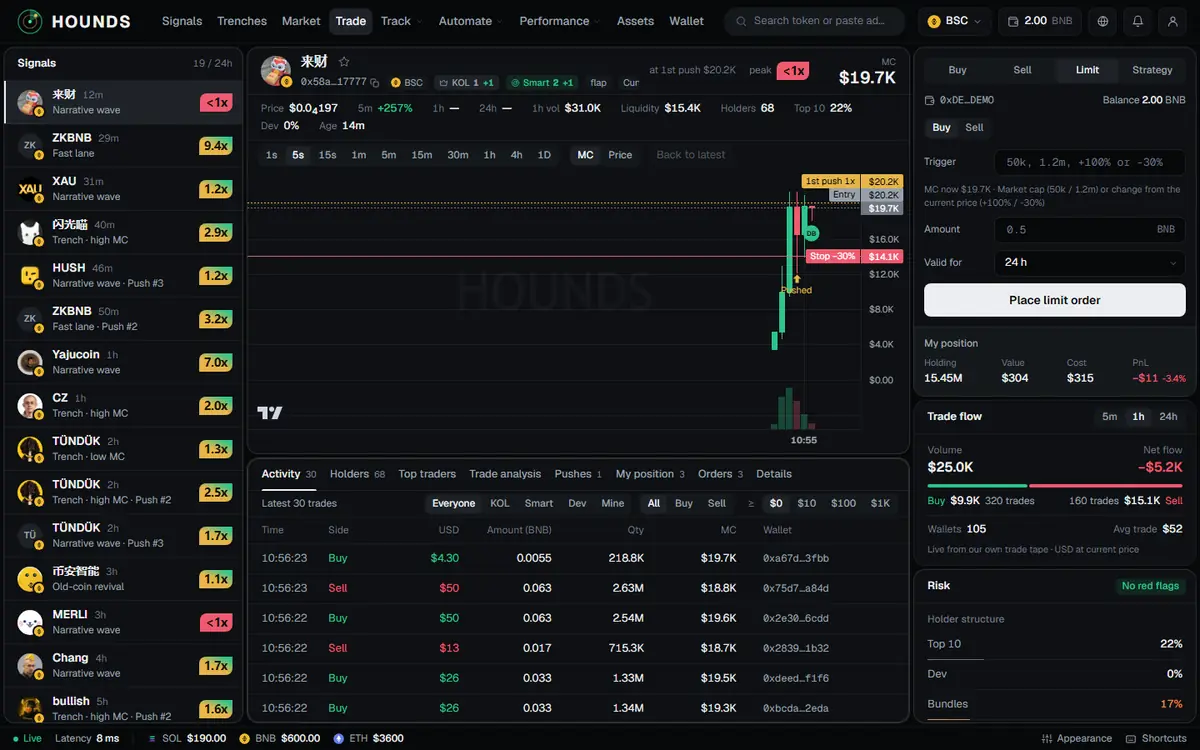
This section covers "buy / sell automatically at a price".
5.1 Place an order
Trade panel → Limit tab:
- Limit order side: Buy or Sell.
- Trigger: either a market cap (
50k,1.2m) or a change from the current price (+100%,-30%). "MC now …" above it is there for reference. - For a buy, enter the Amount (leave it empty to use your default amount); for a sell, choose the Position (if you hold more than one) and the Sell share (25% / 50% / 75% / 100%).
- Valid for: 1 / 6 / 12 / 24 / 48 / 72 hours, 24 hours by default.
- Tap Place limit order → check the Token, Side, Trigger, amount or share and validity in "Confirm limit order" → tap Place limit order again. On success you see "Limit order placed · #ID".
Examples. Buy: 50k (buy when the market cap falls to $50k), -30% (buy after a 30% drop). Sell: +100% with 50% (sell half when it doubles), 500k (sell everything at a $500k market cap), -40% (sell everything after a 40% drop).
5.2 View and cancel
- Trading desk Orders tab: type (Limit / Market), Trigger (for example "MC ≥ …"), Status (Open / Triggered / Filled / Cancelled / Expired / Failed …). Tap Cancel on an open order.
- Assets → Orders → Limit orders can cancel too.
- If the cancel result is unknown, the page tells you: the list has been refreshed — if this order is still open, cancel it again.
5.3 Rules
- Up to 10 open limit orders per person (when full: "You already have 10 open limit orders, which is the maximum.").
- Valid for 1–72 hours.
- The target must be between 1% of and 100× the current price, and not too close to it (at least 0.5% away).
- The backend checks live prices; once the price is reached, the order goes through the normal buy / sell flow.
- On a device logged in for less than 24 hours, limit buy orders can likewise only be placed on tokens pushed in the last 24 hours (2.8).
Try it on the workbench while you read.
Open the workbench