 Hounds
中文
Log in
Step 6 of 14
Signals, trenches and market
Hounds signals come from our own on-chain index, and their multiples are the peak since the first push, not your P&L. Follow pushes on Signals, new launches in Trenches and the trading ranking in Market, with web alerts or Telegram pushes.
This section covers where signals come from, how to read the pages, and how to get alerts.
6.1 What a signal is
- Hounds signals: our own on-chain index scans every new token on each launchpad trade by trade, and pushes it when conditions on money flow, holders, holder structure and so on are met. Every signal belongs to a rule, and rules are grouped into categories.
- Public channel: cards for outside new-token signals after our own checks. They have their own tab and are never mixed with Hounds signals or counted together.
- Signals are judged only on whether the price rose after the push. Multiples are always measured from the price at the first push, and what you see is the Top multiple reached since the push. It is not the current return, and certainly not your P&L.
- Which chains have signals is whatever the page shows (when a chain has had no signal in 24 hours, the page says "No signals on this chain in the last 24 hours").
6.2 Signals page
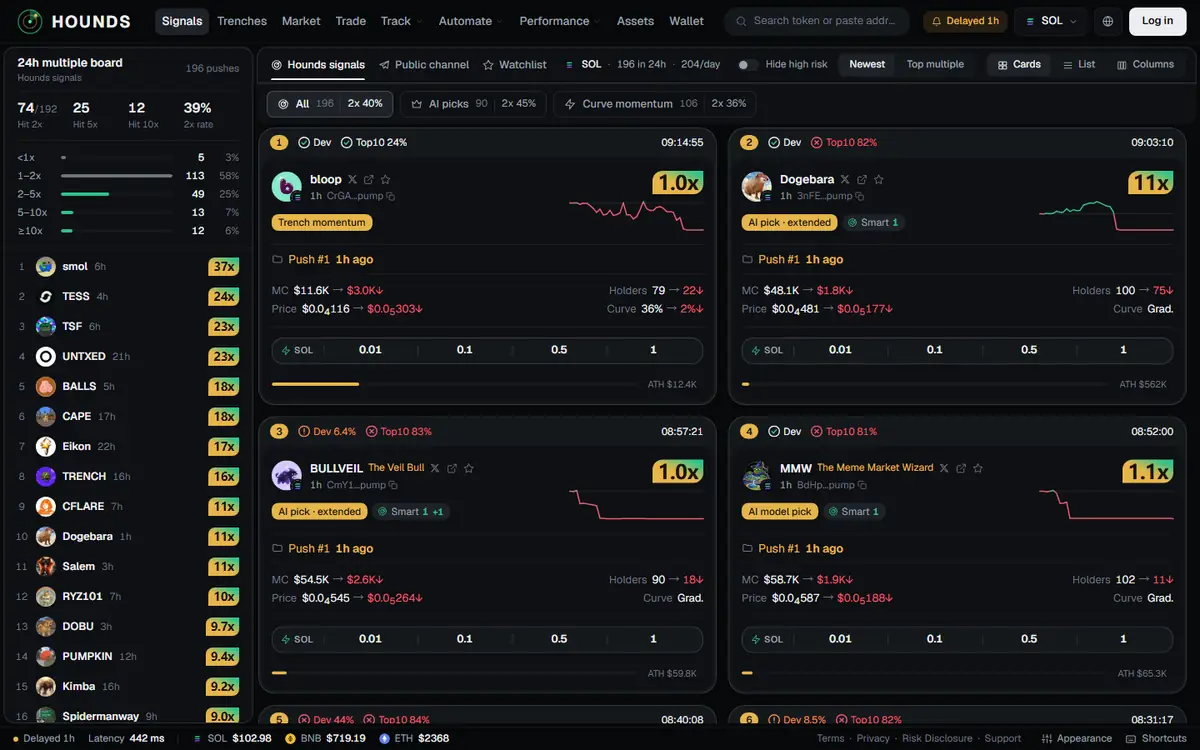
Signals in the top bar (also the home page). The 24h multiple board is on the left and the signal feed on the right.
| Control | What it does |
|---|---|
| Source tabs | Hounds signals · Public channel · Watchlist (tokens on your watchlist). Next to them: stats for the current chain, such as signals in 24h and per day. |
| Category buttons | All · AI picks · Curve momentum · Narrative · Graduation buyers · Revivals · Other (only categories the current chain has). Each button shows its count and past stats. |
| Hide high risk | Hides signals with risk items over the line. |
| Sort | Newest / Top multiple. |
| View | Cards · List · Columns. In Columns you can Add column (up to 6); each column has its own Chain, Source and Rule, and each can turn on "Sound for new signals in this column". |
The 24h multiple board on the left shows the peak distribution (Hit 2x / Hit 5x / Hit 10x) and the 2x rate. This is the peak since the first push, not the current return. Tap Full ranking for the Multiples page (6.6).
Every number on these pages is a past statistic and says nothing about the future.
6.3 Reading a signal card
| Where | What |
|---|---|
| Top strip | Number · risk marks (Bundles, Dev, Top10 and so on; green = fine, orange = close, red = over the line) · push time |
| Identity | Avatar, symbol, name; Search on X, Open on GMGN and Watchlist (star) icons; age; contract (tap to Copy address) |
| Tags | Rule category and rule name; KOL n (n KOL wallets had bought when this was pushed; the +N after it is how many bought after the push); Smart n (wallets on the Hounds own list that have bought this token; the +N after it is how many bought after the push; hover to see how many at push, after the push and in the strong tier. Where a count is labelled "last 24h", it covers the last 24 hours) |
| Top right | Top multiple since the push and a small trend chart |
| Push line | Push #n · how long ago. Repeat pushes of one token are merged into one card, and multiples and "at push" values are measured from the first push. |
| Four figures | MC, Holders, Price (at push → now), Curve (bonding-curve progress, or Grad.) |
| Quick-buy bar | Four quick-buy amounts; one tap buys (2.5) |
| Bottom | ATH market cap bar |
Tap a blank part of the card to open the trading desk. On public-channel cards the fourth figure is Wallets (bundler / sniper / fresh wallet counts).
6.4 Trenches
Trenches in the top bar: new launches in real time, in three columns: New · About to graduate · Graduated. On narrow screens they become tabs, one column at a time.
- You must be logged in (otherwise: "Log in to see the trenches."). If a chain has no trenches, the page says so and lists the chains that do.
- At the top you can filter by Keyword and pick a Quick-buy amount (from your quick-buy amounts).
- Each card: symbol, contract, launch time, MC, Curve, Vol, TX, Buy share, Holders, risk tags, KOL / smart money counts, social links (Website, X (Twitter), Telegram), and a "Buy amount coin" button that buys in one tap.
6.5 Market
Market in the top bar: a ranking of the whole market by trading (from our own trade tape).
- Ranking: Hot · Gainers · New; Window: 1m · 5m · 1h · 24h.
- Columns: Token, Age, market cap, Volume, Buy share, Txs, 1h wallets and more. Tokens we pushed are marked "Hounds pushed".
- "Price anomaly": an implausible gain or market cap (usually a cornered supply). Such tokens are excluded from Gainers.
- Which chains have market data is whatever the page shows.
6.6 Multiples and Record
- Performance → Multiples: browse pushed tokens by First pushed within (1h / 6h / 24h), Rule category and Sort (Top multiple / Newest), with the columns First push, MC at first push → now, ATH MC and Holders at push. Repeat pushes of a token count once. Logged out, you cannot see pushes from the last hour.
- Performance → Record: the last 24 hours of Pushes / Tokens / Best; a Pushes per hour bar chart; the Latest 10 pushes; and a By rule table (7d samples, 7d 2x rate, 7d 5x rate, 7d dead rate, Time to peak, 24h best and more).
- All of these are statistics after the push (dead within 30 min = no 2x within 30 minutes of the push and, at the 30-minute mark, below half the push price or no trades in the last 10 minutes). They say nothing about the future and are not your P&L.
6.7 Track: watchlist, alerts, wallet monitor
Track → Watchlist:
- Tap the star on a signal card or the trading desk, or paste a contract address at the top right of the page and tap Add. If the address exists on more than one chain, you pick the chain.
- Columns: Token, market cap, 24h volume, 24h pushes and more; prices refresh about every 15 seconds. You can create a New group (up to 12 groups, names up to 12 characters) and Move to group.
- Once you log in, your watchlist syncs to your account (up to 200 tokens) and survives a change of device; groups are saved only in this device's browser.
Track → Watchlist → Alerts tab:
- New-signal alert: alerts you when a new Hounds signal meets all your conditions: Chains, Rule type, Market cap at push (USD) (Min / Max; you can type 10k or 1.5m), Bundles at most, Holders at least, Require a KOL buy.
- Watchlist alert: alerts you when Hounds pushes a token on your watchlist again.
- How to notify: Browser notifications, Sound, in-page message; you can Send a test alert. Preview shows which signals from the last 24 hours would match.
- Note: alerts only fire while the page is open. Switch to another page or close it and they stop. Conditions are saved only in this device's browser. On iPhone, add the site to the Home Screen first to get web notifications.
Track → Wallets (wallet monitor):
- Add wallet → paste the address, pick the chain and add a note (optional, up to 24 characters). Up to 20 wallets; the list is saved only in this device's browser.
- Every buy and sell by these wallets in the last 3 days is listed by time, refreshing about every 10 seconds.
- Official lists: KOL (tokens pushed in the last 24 hours that KOL wallets had already bought at push time) and Smart money (what list wallets bought and sold recently; SOL and BSC only). This is only a record of what they did, not buying advice.
6.8 Pushes to Telegram
Web alerts only work while the page is open. To get signals on your phone at any time, use Telegram pushes (your account needs a Telegram identity):
- Current entry point: Account → Notifications → Telegram signal pushes → Set up in the bot, which opens the bot's push settings.
- Once the Account → Signal push section appears on the web, you can also change them right there. The options are the same as in the bot:
| Setting | Options | What it does |
|---|---|---|
| Push signals | On / Off | Signals are sent to your private chat with the Hounds bot. You just need a wallet; no balance is required. |
| Mute | Mute 1 hour / Unmute | Pauses pushes for one hour. |
| Sound alerts | 1 / 3 / 5 / 10 times, 3 by default | Rings at most this many times every 10 minutes; the rest arrive silently. |
| Sources | Trench signals · Public channel · Custom channels (n) | Pick any. |
| Chains | Each chain | Only signals on the chains you keep on are pushed. |
| Levels | S level · rings · A level · silent | B-level signals only appear on the board and are never pushed. |
| Custom channels | Enter @channel or t.me/channel → Add | Public channels only, up to 5 per person. Pushes start from the next new post; the same token is pushed at most once every 30 minutes; if you use auto-trading, signals from these channels can trigger it too. |
Trench signals push the same token at most once in 24 hours (it is pushed again if it moves up to a higher level).
Try it on the workbench while you read.
Open the workbench